
MyRXNT
RXNTMedical
4.6216.00 Reviews
- Version
- 2.6.1
- Installs
- 50.00K
- Age Rating
- Everyone
Screenshots
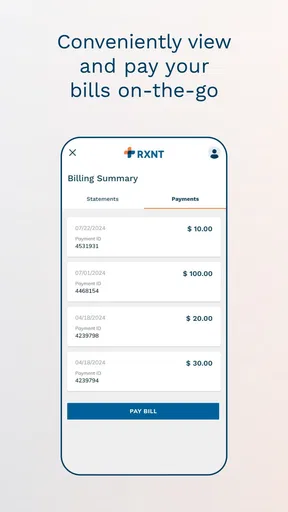

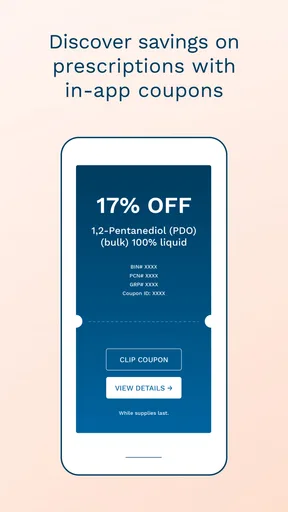
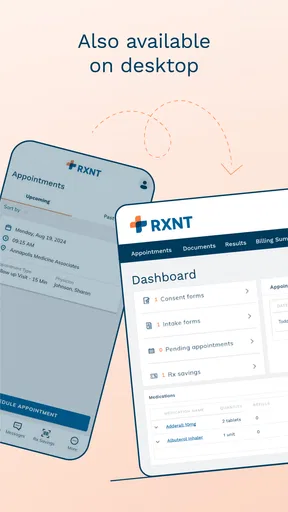
Our Review of MyRXNT
 Analysis by Appyee
MyRXNT is a medical app from RXNT that aims to make communication with your care team easier to manage from a phone. I approached it as a practical companion rather than a replacement for a clinic, a diagnosis, or urgent medical help. That distinction matters: the value here is in keeping routine care-related tasks closer at hand, not in turning a smartphone into a doctor’s office.
After spending time with the app, I found its appeal easiest to understand when viewed through a normal day. You may be away from home, remember a question about an upcoming appointment, or want to check a care-related message without opening a desktop browser. In that kind of situation, a dedicated mobile app feels more natural than searching through email or relying on a general web page. My main impression is that MyRXNT is built for continuity and convenience, not medical emergencies.
How MyRXNT feels during everyday use
I find MyRXNT easiest to judge by the small moments it is meant to support: keeping a care-related question in one place, then returning to it when I have time to follow through. That makes preparation worthwhile; before relying on any medical app, I would decide which routine task I want it to simplify and test that workflow without time pressure. From there, the key question is how thoughtfully I handle the personal information involved.
Speed expectations: useful when you want a focused medical workspace
The app’s purpose gives it a fairly clear performance target. I do not expect a medical companion such as MyRXNT to behave like a game or a social feed, where instant transitions and constant scrolling are the whole experience. What I want instead is a focused path to care-related information and communication, without unnecessary visual clutter or a long learning curve.
That focus is important for people who only open a healthcare app occasionally. If you use something every day, you can tolerate a complicated layout because muscle memory eventually takes over. Medical apps are different. A person may return after weeks away, perhaps while preparing for a visit or trying to follow up on a question. In that context, a simple mental model is more valuable than a large collection of impressive but rarely used tools.
I also like the idea of using a dedicated application rather than treating a clinic’s mobile website as the default. A browser can be perfectly adequate, but it often leaves the user managing tabs, saved passwords, and small-screen pages designed for a wider display. MyRXNT is more appealing when you want one recognizable place for your care connection. The trade-off is that a dedicated app becomes another item to maintain on your phone, so its convenience depends on how regularly you interact with RXNT-supported care.
For new users, I would begin by opening the app at a calm moment rather than waiting until I am already rushing to an appointment. I would check how the main navigation is arranged, confirm that I can reach the information I expect, and make sure I understand where communication begins. This small preparation avoids the common mistake of testing a healthcare app for the first time when a response is already time-sensitive.
Heavy-use moments are more about context than constant activity
MyRXNT is unlikely to be “heavy use” in the same way as a video editor or a navigation app. The demanding moments are more likely to happen when several care-related tasks come together: reviewing information, moving between sections, composing a message, and returning later to check whether anything has changed. That is when an otherwise simple medical app earns or loses its place on the phone.
A realistic example would be a weekday morning before work. I might remember that I need to ask about a prescription, open the app to review the relevant care information, write a concise message, and close it before leaving home. Later, I would want to return without reconstructing the entire context. The practical advantage is not entertainment or speed for its own sake; it is reducing the number of separate places where I keep track of healthcare conversations.
Another useful scenario involves a family member helping an older relative. The helper may not want to manage several unrelated channels, such as phone calls, paper notes, and browser sessions. A mobile care app can provide a more consistent routine, provided the relative’s clinic and account setup support the necessary interaction. I would still keep a written list of important questions for the appointment, because an app can organize communication but cannot guarantee that every concern will be resolved immediately.
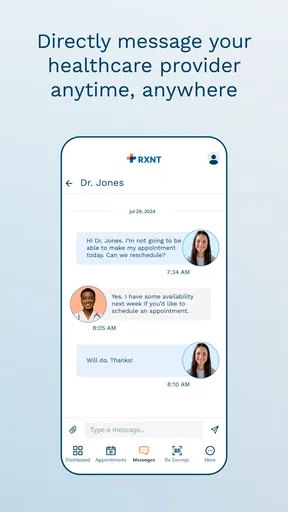
One non-obvious habit I recommend is drafting complex questions before opening the app. Healthcare messages are easier to understand when they include the relevant context, the actual question, and what kind of response is needed. Writing that outline elsewhere first can prevent a rushed message and reduces the temptation to send several short notes that are difficult to follow. MyRXNT can be the delivery point, but the quality of the conversation still depends on how clearly the patient explains the issue.
Heavy use can also expose a limitation common to care portals: the app is only as useful as the organization and professionals connected to it. If your clinic does not use RXNT for the part of care you need, the application cannot replace that clinic’s preferred process. I would confirm the app’s relevance with the provider before treating it as my central healthcare channel.
Reliability: stability matters more than visual polish
For this kind of application, reliability is not simply whether the screen opens. I care about whether I can return to the same care conversation, whether information is presented consistently, and whether I can tell what happened after taking an action. A medical app should encourage careful checking rather than leave the user guessing whether a message or request went through.
The app has been available since January 11, 2022, and its current version is 2.6.1. Those details suggest an established product rather than a brand-new experiment, although an app’s age alone cannot guarantee a perfect experience on every phone. I would still keep the application updated through the normal app-store process, especially because medical software may depend on compatibility changes in the operating system.
MyRXNT has an average rating of 4.6 from around 777 ratings, with about 216 written reviews. I read that as encouraging evidence that many people find it useful, but not as a promise that every clinic workflow will feel identical. Healthcare applications can vary significantly depending on the provider’s setup, the account permissions available to a patient, and the type of information being exchanged. A strong overall rating is helpful context, not a substitute for testing the exact tasks I need.
One practical recovery tip is to avoid assuming that a missing update means something has been deleted. If information appears incomplete or a screen does not behave as expected, I would first check the connection, reopen the app, and verify the account context before repeatedly submitting anything. In a medical setting, duplicate requests can create confusion. If the matter is urgent, I would use the clinic’s established phone or emergency route instead of repeatedly refreshing the app.
I also would not use the application as the only record of an important medical instruction. For significant changes, I would read the response carefully, preserve the relevant details in a personal note if appropriate, and ask the provider to clarify anything ambiguous. That is not a criticism of MyRXNT specifically; it is a sensible boundary for any digital care channel.
Device constraints and the cost of keeping another app installed
MyRXNT is free, which removes the most obvious barrier to trying it. It is rated for Everyone, so its intended audience is broad, although the usefulness of the app still depends on having a participating care relationship and an account that can access the relevant services. Free does not mean universally applicable, and I would not install it expecting it to connect automatically to every healthcare provider I use.
The minimum operating-system requirement is Android 8.0. That is helpful for people with older Android phones, but compatibility is not the same as a comfortable experience. A device may technically run the app while still having limited storage, an aging battery, or a crowded notification system. Medical apps are not usually the largest applications on a phone, yet keeping some free space available and installing operating-system updates when practical can reduce avoidable friction.
If I were using an older device, I would pay attention to three things. First, can I open the app without closing several other applications? Second, can I read the text comfortably without relying on a tiny screen? Third, can I receive or notice important updates without the phone’s battery-saving settings interfering? These are device-level questions, but they directly affect whether a care app feels dependable.
People who switch between Android and iOS should also think about continuity. The app is presented as a mobile product for staying connected to care, but the day-to-day experience can still differ between devices because of operating-system behavior, notification handling, and account setup. I would not move between phones immediately before an important appointment without first signing in and checking that the expected access is available.
There is another trade-off that is easy to overlook: a healthcare app can make information more convenient while also placing sensitive activity on a personal device. I would use a screen lock, avoid leaving the app open in public, and be careful with notification previews if other people can see my phone. These habits are especially important on shared devices. MyRXNT may simplify access, but convenience should not lead me to ignore basic privacy around medical conversations.
Where it fits beside the usual alternatives
The most obvious alternative is a clinic’s website in a mobile browser. That option may be better for someone who uses several different healthcare systems and does not want a separate application for each one. A browser also avoids filling the phone with specialized apps. On the other hand, MyRXNT makes more sense when RXNT is already part of the care relationship and I want a recognizable, dedicated route back to that environment.
Phone calls remain the better choice when the issue is urgent, complicated, or difficult to explain in writing. A call allows a staff member to ask follow-up questions immediately, while an app message may require waiting and checking for a reply. For routine communication, the app can be less disruptive than calling during office hours. For symptoms that could represent an emergency, neither the app nor a routine message should be my first step.
Email may feel familiar, but I would prefer a purpose-built medical channel for care-related exchanges when one is available through my provider. Email can mix personal and medical correspondence, and it is easier to lose a message in a crowded inbox. MyRXNT’s value is strongest when it keeps the interaction tied to the care relationship rather than asking me to manage healthcare as another ordinary email thread.
Paper notes and calendars still have a role. I would use them for preparing appointment questions, recording what I want to discuss, or keeping a simple reminder. The app is better suited to the digital side of the relationship; it should not become an excuse to stop preparing for a visit or to assume every detail will be available at the exact moment I need it.
Who should use MyRXNT, and who should skip it?
I would recommend MyRXNT to patients whose providers use RXNT and who want a convenient mobile connection for routine care-related tasks. It is also worth considering for people who dislike juggling browser tabs and email when they need to communicate with a clinic. Family members assisting with care may appreciate having a more structured place to check information, as long as account access is handled appropriately and the patient’s privacy remains respected.
I would be more cautious if I rarely use digital healthcare tools, if my provider does not rely on RXNT, or if I need immediate answers rather than routine communication. In those cases, a phone call or the provider’s established website may be more practical. Someone managing several unrelated clinics may also prefer a broader health-management solution, because a provider-specific app can be convenient for one relationship without becoming a complete medical organizer.
The app is not a substitute for emergency services, a diagnostic consultation, or a direct conversation when the situation is medically serious. That boundary should guide the decision to install it. MyRXNT is most useful in the space between visits and calls: the ordinary, sometimes easily forgotten communication that helps a care relationship stay organized.
My performance verdict after weighing convenience against friction
MyRXNT leaves me with a positive but measured impression. Its strongest quality is not flashy performance; it is the possibility of making an existing RXNT-supported care relationship easier to reach from a phone. The free price and Everyone age rating make trying it straightforward, while support for Android 8.0 keeps it accessible to many older devices.
The main limitation is dependency on the surrounding healthcare setup. The app cannot create a connection where a provider has not enabled one, and it cannot turn delayed or complex medical communication into an instant answer. Its reliability should therefore be judged by the complete workflow: the phone, the account, the provider, and the user’s expectations all matter.
With more than 50 thousand installs, it has found a meaningful audience, and the 4.6 average gives prospective users a reassuring starting point. I would still test it with a low-pressure task first, learn where the important sections are, and keep an alternative contact method available. That approach gives the app a fair trial without making it responsible for situations it was never designed to handle.
Overall, I see MyRXNT as a sensible medical companion for routine access and communication rather than an all-purpose health platform. If RXNT is already part of your care experience, I think it is worth trying because a focused mobile route can remove small but persistent hassles. If your needs are urgent, spread across many providers, or mostly offline, another option may serve you better. My recommendation is simple: use it to stay connected, but keep human medical support as the final authority.
Verdict
Strengths of MyRXNT
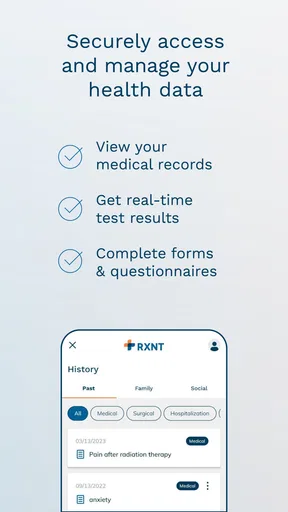
- Secure access to prescriptions, appointments, and health records in one app.
- Prescription refill requests can save time compared with calling the pharmacy.
- Useful for managing information from participating RXNT-connected providers.
- Mobile access makes key medical details available while away from home.
- Helpful reminders can support better organization of medications and visits.
Limitations of MyRXNT
- Features depend heavily on your provider, pharmacy, and RXNT account setup.
- Some users may find the interface less intuitive than newer health apps.
- Medication information may not update immediately after a prescription change.
- Not all pharmacies or healthcare providers may support every available feature.
- Requires careful handling of login credentials because it contains sensitive health data.
Similar Picks in This Category
View All
WebMD: Symptom Checker
WebMD, LLC4.1

Microphone Amplifier
DOSA Apps4.2

Anatomy Learning - 3D Anatomy
3D Medical OU4.5

Period Tracker and Calendar
SimpleInnovation4.9

GoodRx: Prescription Coupons
GoodRx4.8

CVS Health
CVS Pharmacy4.5
Frequently Asked Questions
What is MyRXNT, and who is it designed for?
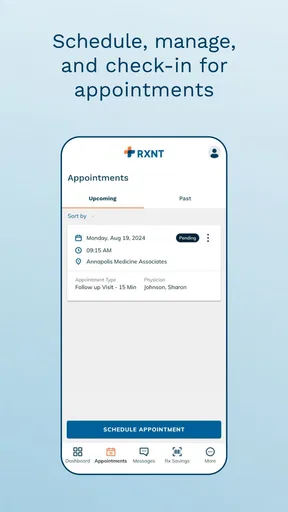
MyRXNT is a healthcare management app connected to the RXNT platform, intended for patients whose healthcare providers use RXNT services. Depending on the provider’s setup, the app may allow you to view health information, manage appointments, review prescriptions, access billing details, and communicate with a medical office. Features can vary, so access depends on your provider and account permissions.
How do I sign in to MyRXNT?
To use MyRXNT, you generally need login credentials supplied by a participating healthcare provider or created through the available registration process. Enter your username and password carefully, and use the password-recovery option if you cannot sign in. If your practice has not enabled patient access or your account is not activated, you may need to contact the provider’s office directly.
What can I do inside the MyRXNT app?
The available tools depend on how your healthcare organization configured RXNT, but MyRXNT may provide access to appointments, patient records, prescriptions, statements, payments, and secure communication. Some users may also be able to request refills or complete forms. The app should be viewed as a convenient connection to your provider, not as a replacement for urgent medical care.
Is MyRXNT safe for viewing personal health information?
MyRXNT is designed to provide access to sensitive healthcare information through an authenticated patient account. You should still protect your login details, use a strong password, avoid signing in on shared devices, and enable device security such as a passcode or biometric lock. Always log out when appropriate, and contact your provider if you notice suspicious account activity.
Can I use MyRXNT for emergencies or immediate medical advice?
No. MyRXNT is intended for routine healthcare administration and communication with participating providers, not emergency treatment. Do not wait for an in-app response if you have severe symptoms or believe you are facing a medical emergency. Call your local emergency number or go to the nearest emergency department. For non-urgent questions, use the app or contact your provider’s office.
